Phone Tracker
- 4.0
- Rating
- 10.00M
- Installs
- Free
- Price
 Analysis by App-foxy
When I try a phone-tracking app, I care less about a long feature list and more about one practical question: can it help me locate a phone when I genuinely need to find it? Phone Tracker focuses on that everyday problem through GPS location, and that narrow purpose makes it easier to understand than many crowded navigation tools. I found it most useful as a simple location aid for situations where a misplaced device, a family meeting point, or a moving person creates uncertainty.
Phone Tracker is a free Maps & Navigation app from WeFindertools. Its store summary presents it as a phone tracker and GPS location tool, while the shorter description keeps the promise even simpler. That simplicity is important. This is not an app I would choose for turn-by-turn driving directions, detailed route planning, or a full travel toolkit. I see it as a focused utility for checking where a phone is and using that information to make a practical decision.
The app is available to an Everyone audience, which makes its basic purpose approachable for a wide range of users. It runs on Android 7.0 and later, and the current version is 1.7.28. With more than ten million installs and an average rating of 4.1 from roughly twenty-six thousand ratings, it has clearly found an audience beyond occasional experimentation. Those figures do not replace personal testing, but they do suggest that the straightforward location idea works for many people.
You May Also Like

 Blood Strike: 2.5 Anniversary
Blood Strike’s Loadouts Turn Every Drop Into a Tactical Gamble
A close look at Blood Strike’s custom loadouts: how fast access to signature weapons reshapes its battle royale rhythm, rewards preparation, and narrows the gap between fights.

 Pandora - Music & Podcasts
Pandora’s Music Is Easy to Start, but Harder to Recover
Pandora’s strength is its low-effort path from a seed to a station. Its weak spot is how much confidence it asks you to place in connection, setup, and quiet recovery.

 8 Ball Pool
 Is Built on Rivalries, Rematches, and Routine
A close look at the rivalries, rematches, shared routines, and unanswered safety questions that turn a quick pool match into a persistent mobile community.

 Samsung Music
’s Quiet Strength Is Playing What You Already Own
Its reach comes less from spectacle than from dependable access to a personal library. That simplicity is both the app’s strongest retention engine and its ceiling.

 AccuWeather: Weather Radar
AccuWeather Review: A Quick, Clear Forecast for Everyday Decisions
For everyday plans, the best forecast is the one you can understand quickly. AccuWeather makes rain timing, radar, and local conditions easy to act on, with a few trade-offs.

 Hill Climb Racing
Why Hill Climb Racing Still Turns Crashes Into One More Run
A tiny car, a bumpy hill and one more upgrade: Hill Climb Racing keeps resurfacing because its simple chaos makes every near-miss feel personal.
More From Our News Desk
View All News


What the GPS location capability really changes
I find that GPS location changes the task from guessing where a phone might be to choosing a sensible place to check first. In this section, I look at what that clue can and cannot establish, especially when the device is indoors or has been left behind. The useful distinction is between locating a phone and knowing exactly what happened to it.
A location view is useful because it reduces guesswork
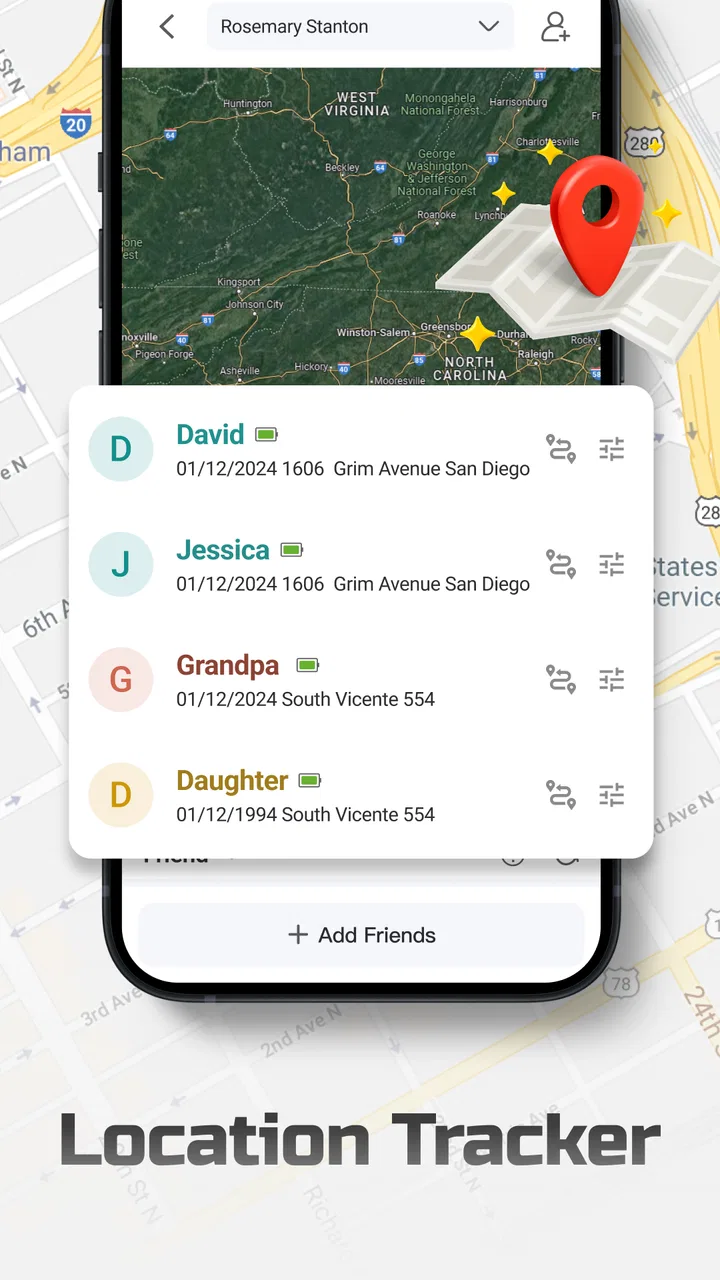
The central benefit is not that a map looks impressive; it is that a location view can turn a vague problem into a next step. If I cannot remember where I left a phone, seeing its reported position gives me a starting point. If another person is trying to meet me, a location-based check can make the conversation more concrete than descriptions such as “near the entrance” or “somewhere on the next street.”
That distinction matters because a phone tracker is only valuable when it helps me act. I might walk toward the displayed area, check the last place I used the device, or contact the person carrying it. The app does not need to replace a navigation service to be useful. Its job is to answer the narrower question of where the tracked phone appears to be, so I can decide what to do next.
I also like that this focus makes Phone Tracker easier to approach than a general mapping app. A conventional map is excellent when I already know the destination and need directions. Here, the starting point is uncertainty. I am not asking how to reach a known address; I am trying to establish where the phone is before planning anything else. That is the main reason I would keep this type of app available.
It is a locator, not a substitute for every navigation tool
It is important to set expectations correctly. Phone Tracker belongs in the location-finding part of the navigation category, not in the same mental box as a complete driving, walking, or public transport app. If I need traffic-aware directions, saved places, route alternatives, or detailed travel planning, I would use a dedicated mapping service instead.
That limitation is also a strength. A tool with one clear purpose can be quicker to understand during a stressful moment. I do not want to browse layers, trip options, or unrelated travel information while trying to establish where a phone might be. The trade-off is that I should not install this expecting an all-in-one navigation experience.
Privacy and consent belong in the setup conversation
Location information is sensitive, so I would only use a tracker in a transparent arrangement. If the phone belongs to another person, everyone involved should understand what is being shared and why. That is not merely a courtesy; it is the difference between a useful safety or coordination tool and an intrusive one.
I would also avoid treating a displayed location as unquestionable proof of someone’s exact position. A phone can be left behind, carried by somebody else, or shown in a nearby area rather than precisely at the place I imagine. The sensible workflow is to use the location as a clue, then confirm the situation through normal communication or by checking the surroundings.
How I would use it in practice
In practice, I would make a calm test part of getting familiar with the app, then use a location check to guide a search rather than repeatedly checking the map without a plan. I also think through which device I am checking and whether it is actually with the person I am trying to reach. That preparation matters most when the next section turns to a familiar, time-pressured situation.
Start before the emergency, not during it
The most useful preparation is to open Phone Tracker when everything is calm. I would make sure I understand which phone is being tracked, how the location view is presented, and what I should expect when the device moves. Learning those basics after a phone disappears is exactly when frustration is highest.
This is one of the less obvious lessons with location apps: the quality of the experience often depends on preparation rather than the map itself. A tracker cannot help much if I have never checked its setup, do not know which device I am looking for, or assume that a location display automatically means the phone is in my hand’s reach. A short test in an ordinary place can reveal whether the workflow feels clear enough for a real problem.
Use the result as a search plan
If I misplace my phone at home, I would treat the displayed position as the first stage of a search rather than the final answer. I could check the room where the phone last made sense, then retrace my movements around that area. If the phone is in a public place, I would use the location to narrow the search and think about when I last had it, rather than wandering without a plan.
This approach is more effective than repeatedly refreshing without changing what I do. A tracker provides information; I still need a search method. I would note whether the location seems consistent with my memory, whether the device may have been moved, and whether another person could have picked it up. That small bit of reasoning prevents me from overreacting to a single map position.
Keep the app separate from route planning
Once I have a likely area, I would switch mentally from locating to navigating. Phone Tracker helps answer “where should I look?” A regular map helps answer “how do I get there?” Keeping those roles separate makes the experience less confusing. I would not judge this app harshly for lacking the broader tools I expect from a route planner, because its value comes from solving the earlier problem.
This separation is also helpful when meeting someone. I might use the tracker to understand their general location, then choose a familiar landmark or direct route separately. That is usually clearer than trying to make one app handle both the position check and every detail of the journey.
Do not confuse a phone’s location with a person’s location
This is the most important practical caution. The app tracks the phone, not an invisible version of the person. A device left in a car, office, bag, or room can produce a location that is technically useful but socially misleading. If I am coordinating with someone, I would confirm that they have the device with them before drawing conclusions.
That distinction is especially relevant for families and shared devices. A phone may be passed between people, placed on a charger, or forgotten somewhere. Phone Tracker can help narrow down the device, but it should not be used to make assumptions about someone’s actions based only on a map marker.
The everyday situation where it makes the most sense
A busy trip home is where I can most clearly see the point: if a phone is missing after several stops, a location clue can help me decide whether to search at home, contact a venue, or retrace part of the journey. It does not settle the question by itself, but it can make the first decision less random. I’ll use that scenario to show why this focused tool can complement, rather than replace, a regular map.
A misplaced phone after a busy day
The strongest scenario for me is a phone that has gone missing during an ordinary but hectic day. Imagine leaving a café, taking public transport, and arriving home before realizing the phone is not in a pocket or bag. Memory is unreliable in that situation. I would use Phone Tracker to establish whether the device appears to be at home, near the café, or along the route between them.
Each possibility leads to a different response. If it appears at home, I would search systematically instead of retracing the entire journey. If it remains near the café, I would contact the venue or return there. If the location points somewhere unexpected, I would pause before assuming theft or loss and consider whether another person may have picked it up. The app’s value is the way it helps prioritize those decisions.
This scenario shows why a focused tracker can be more useful than a general map. A standard map can show me every road around the area, but it cannot replace a location clue about the device itself. Phone Tracker gives the problem a geographic shape, which is often enough to make the next action obvious.
Meeting coordination without constant messages
A second useful situation is coordinating a meeting when one person is moving and the exact arrival point keeps changing. A location check can reduce a chain of vague updates and help me choose a better meeting spot. I would still communicate directly, but the map context can make those messages shorter and more accurate.
I would not use this casually with everyone. Location sharing should be limited to people who have agreed to it, and I would stop using it when the practical reason ends. The convenience is real, but it should not become a background habit with no clear purpose.
Checking a shared or spare device
Phone Tracker may also suit households that keep a spare phone for emergencies or use a device as a simple contact point. In that case, the location is attached to a physical object that may be moved between rooms, bags, or vehicles. The benefit is less about watching a person and more about knowing where the useful device was left.
That use case also exposes a limitation: if several phones are involved, clarity becomes essential. I would label or otherwise distinguish devices in my own routine so I do not act on the wrong location. The app can provide the location information, but organization around the app remains my responsibility.
Where the experience can become frustrating
The practical limits matter just as much as the convenience. A location view may not pinpoint a device inside a building, and a phone without power or a usable connection may not give me the clue I need; in those moments, calling, retracing steps, or using other device-recovery measures may be more appropriate. I also consider when a full navigation app is simply the better fit.
Location information is not always the whole answer
A GPS position can narrow a search, but it does not automatically tell me whether the phone is inside a building, under a seat, in another room, or with someone nearby. I would expect to do some physical searching after using the app. Anyone wanting a guaranteed “find it instantly” button may be disappointed by the nature of the problem itself.
The same issue applies when a phone is moving. A location view may help me understand direction or area, but I would avoid making precise timing promises based on it. For a changing situation, a direct call or message can be more useful alongside the tracker than relying on the map alone.
Battery and connectivity affect the practical result
A tracker is only helpful while the phone can provide location information. A device with no power, no usable connection, or an unavailable location signal can limit what I can learn. I would therefore treat Phone Tracker as part of a broader recovery plan, not as a replacement for sensible habits such as remembering where I put the device and keeping important contact details accessible elsewhere.
This is a genuine trade-off compared with simply calling the phone. A call can make a nearby device ring and may be faster when I know it is somewhere in the room. The tracker becomes more valuable when I do not know the area at all. In practice, I would try the simplest method first and use the location view to narrow the search when that is not enough.
It is not the best choice for advanced navigation
If my main goal is driving directions, cycling routes, public transport planning, offline maps, or a detailed record of journeys, I would choose a specialized navigation app. Those tools are designed around destinations and routes, while Phone Tracker is designed around finding a phone. Expecting it to do both would make the comparison unfair and the user experience less satisfying.
I would also skip it if I am uncomfortable with the idea of location tracking altogether. No convenience is worth ignoring that concern. For someone who wants only occasional directions and never needs to locate a device, a normal map app is likely the cleaner choice.
Who gets the most value from it
I see the best match as someone who wants occasional, purposeful location checks and is comfortable using them openly, rather than someone looking for a complete travel suite or continuous monitoring. The app’s free price and broad age rating make trying its basic role straightforward, but neither removes the need for consent and sensible expectations. My closing view weighs that focused usefulness against the situations where another tool is a better choice.
Good fit for practical, occasional location checks
I think Phone Tracker is best for people who want a focused way to locate a phone without turning the task into a larger navigation project. It can fit a household that agrees on responsible location sharing, a person who frequently misplaces devices, or anyone who wants a simple location clue before deciding whether to search, call, or retrace a route.
The free price makes it easy to try without adding a purchase decision to an already stressful problem. Its Everyone content rating also makes the basic concept approachable for general users. I would still explain the privacy expectations clearly before involving another person, because an accessible app should not be mistaken for an automatic right to monitor someone.
Less suitable for users wanting a complete map suite
People who want one application for every journey should probably look elsewhere. Phone Tracker’s appeal is its concentration on GPS location, not a broad collection of travel features. A full mapping service will be more useful for planning a route, comparing ways to travel, or exploring places. A dedicated family-safety product may be preferable for users who need a larger set of ongoing coordination tools, provided its approach suits everyone involved.
I would also be cautious about relying on it as the only method for recovering a lost phone. A location clue is valuable, but I would combine it with direct contact, a careful search, and appropriate account or device-security steps. That layered approach is more realistic than expecting one app to solve every part of a loss.
My recommendation after weighing the trade-offs
WeFindertools has kept Phone Tracker’s identity clear: it is a location utility, not a general-purpose travel companion. I appreciate that focus because it gives the app a specific role in my phone toolkit. The strongest benefit is the ability to turn uncertainty about a device into a more manageable search area, especially when memory and messages are not enough.
My recommendation is positive for users who need that exact capability and are comfortable using it transparently. I would install it as a practical backup for misplaced-phone situations and agreed location checks, while keeping a regular map app for directions. The app works best when I treat its location as useful evidence rather than perfect certainty. Its real strength is not replacing navigation; it is giving me a sensible place to begin.
FAQs for Phone Tracker
01Is the Phone Tracker app free to use?
Yes, the Phone Tracker app offers a free version with basic features, allowing you to track the location of your devices. However, it may also offer premium plans that include additional features such as real-time tracking, geofencing, and history logs. It's important to check the pricing details in the app store before downloading.
02How accurate is the location tracking?
The accuracy of the Phone Tracker app largely depends on the device’s GPS capabilities and network connectivity. Under optimal conditions, the app can provide a location accuracy within a few meters. However, in areas with poor GPS signals or internet connectivity, the accuracy might decrease.
03Does the Phone Tracker app work internationally?
Yes, the Phone Tracker app is designed to work globally. As long as the tracked device has access to a cellular network or Wi-Fi connection, you should be able to track its location. Be aware of potential roaming charges when using the app internationally.
04What are the privacy implications of using this app?
Using the Phone Tracker app involves sharing location data, which can raise privacy concerns. The app requires permission to access your location and may store this data. It’s crucial to review the app’s privacy policy and ensure you are comfortable with how your data will be used and stored.
05Can I track multiple devices with the Phone Tracker app?
Yes, many Phone Tracker apps allow you to track multiple devices simultaneously. This feature is especially useful for families or businesses. However, check if this capability is included in the free version or if it requires a subscription to a premium plan.
Pros
- Accurate location tracking in real-time.
- User-friendly interface for easy navigation.
- Supports multiple devices simultaneously.
- Provides detailed location history logs.
- Customizable alerts for specific areas.
Cons
- Requires constant internet connection.
- Consumes significant battery power.
- Limited features in free version.
- Privacy concerns with data sharing.
- Not compatible with older OS versions.

Phone Tracker
Gallery